# scale-engine
**Repository Path**: chocolatebrianne/scale-engine
## Basic Information
- **Project Name**: scale-engine
- **Description**: AI 工程化脚手架引擎 — 让 AI Agent 在物理约束下工作,而不是靠提示词自律。
- **Primary Language**: Unknown
- **License**: Not specified
- **Default Branch**: master
- **Homepage**: https://scale-os.hongmaple.top
- **GVP Project**: No
## Statistics
- **Stars**: 0
- **Forks**: 15
- **Created**: 2026-10-09
- **Last Updated**: 2026-10-09
## Categories & Tags
**Categories**: Uncategorized
**Tags**: None
## README


[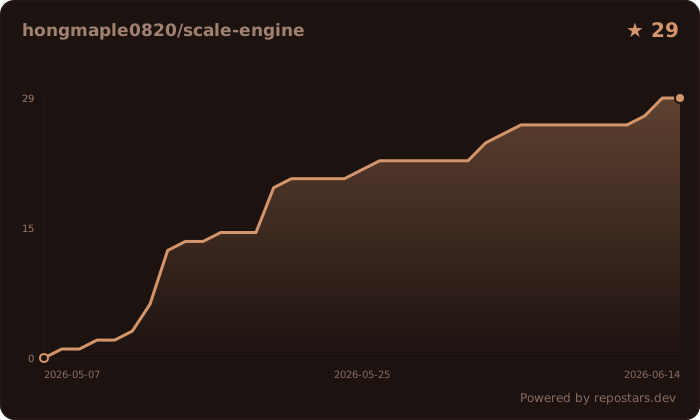](https://repostars.dev/?repos=hongmaple0820%2Fscale-engine&theme=copper)
# SCALE Engine v0.54.1
SCALE Engine turns AI-agent engineering discipline into executable commands, gates, and evidence files instead of relying on prompt discipline alone. It helps humans see what the agent explored, planned, verified, skipped, and why a task is or is not ready to ship.
Source: https://github.com/hongmaple0820/scale-engine
Mirror: https://gitee.com/hongmaple/scale-engine
npm: https://www.npmjs.com/package/@hongmaple0820/scale-engine
Language: [Chinese](README.md) | [English](README.en.md)
Changelog: [CHANGELOG.md](CHANGELOG.md)
## What It Solves
| Failure mode | SCALE mechanism |
| --- | --- |
| Agent says tests passed without running them | Verification profiles and evidence stores record actual commands and results |
| Agent skips discovery, design, TDD, or review | `scale context`, `scale diagnose`, `scale tdd`, and `scale status` produce required next actions |
| Agent accumulates uncommitted changes | Commit Discipline monitors git state with dual-threshold alerts and file grouping suggestions |
| Agent stages unrelated files or edits wrong repo | Review-gated shipping, MOE workspace rules, and child repo blockers control boundaries |
| Multi-session parallel work causes conflicts | Session Coordinator detects file overlaps, records conflicts, resolves dependency ordering |
| Multi-repo Git workflow is chaotic | Cross-Repo Orchestrator coordinates branches, merge plans, and ship pipelines across repos |
## See It In 3 Minutes
```bash
mkdir scale-demo && cd scale-demo
npx -y @hongmaple0820/scale-engine@latest quickstart --dir . --profile standard
npx -y @hongmaple0820/scale-engine@latest setup --dir .
npx -y @hongmaple0820/scale-engine@latest preflight --preflight-profile quick --dir .
```
This generates governance files you can commit to a project:
- `.scale/verification.json`: service matrix and verification profiles
- `.scale/skills.json`: skill routing, source roots, and evidence requirements
- `.scale/skills/`: committed source of truth for reusable workflow skills; legacy `skills/` is fallback-only
- `.scale/tools.json`: CLI/MCP/browser/desktop orchestration policy
- `docs/workflow/templates/`: Mini-PRD, plan, verification, review, and summary templates
- `docs/standards/`: engineering, Git collaboration, and resource governance rules
Continue with a full workflow loop:
```bash
scale context grill --task-id TASK-001 --task "Harden OAuth callback"
scale diagnose plan --task-id TASK-001 --symptom "callback returns 500 when state expires"
scale tdd slice --task-id TASK-001 --behavior "reject expired OAuth state" --failing-test "expired state returns 401"
```
Read [npx and Interactive Install](docs/start/npx-interactive-install.md), [Quickstart](docs/start/quickstart.md), [22-Agent Installation Guide](docs/start/agent-installation-guide.md), and [Agent Governance Demo](docs/start/agent-governance-demo.md) for the complete walkthrough. For positioning against other workflows and agent frameworks, see [Workflow Capability and Competitive Comparison](docs/workflow/competitive-comparison.md).
## Installation
For first-time evaluation, use `npx` without global install:
```bash
npx -y @hongmaple0820/scale-engine@latest onboard --lang en
npx -y @hongmaple0820/scale-engine@latest init --interactive --dir .
```
For frequent use, install the global CLI:
```bash
npm install -g @hongmaple0820/scale-engine
scale --version
```
Node.js 22 or newer is required.
## Who It Is For
- Teams using Codex, Claude Code, Cursor, Gemini CLI, OpenCode, Aider, or similar agents on real projects.
- Teams with multi-service, multi-repository, MOE workspace, or frontend/backend needs.
- Teams that want agents to actively use skills, MCPs, CLIs, and browser automation with safety boundaries.
- Project owners who feel AI code is fast but hard to review, verify, and maintain.
## Core Capabilities
| Capability | Description |
|------|------|
| **Workflow Engine** | `define -> plan -> build -> verify -> review -> ship` phased delivery FSM |
| **Gate System** | build, lint, test, coverage, security, TDD, review gates |
| **AI OS Runtime** | `scale ai-os plan/run/status` — task planning, governed execution, dashboard |
| **Commit Discipline** | Monitors git state, dual-threshold alerts, auto-groups uncommitted files |
| **Session Coordinator** | Multi-session parallel coordination, file overlap detection, conflict recording |
| **Cross-Repo Orchestrator** | Multi-repo Git workflow orchestration, coordinated branch/merge/ship |
| **Task Dependency Graph** | DAG dependency declaration, topological sort, cycle detection |
| **Ship Pipeline** | 8-step ship closure with dry-run, skip, version bump |
| **Security Audit** | OWASP Top 10 + STRIDE security audit engine |
| **Role Skills** | 6 role-based review perspectives (eng-manager, security-reviewer, qa-lead, etc.) |
| **Memory Intelligence** | 6-signal quality scoring, cross-provider conflict detection, freshness decay |
| **Governance ROI** | End-to-end governance ROI — token cost vs quality vs gate friction |
## AI OS Runtime
AI OS Runtime is SCALE's core runtime planning layer. `scale ai-os plan` generates governance mode, Context Compiler budget, Memory Provider recall, Skill Routing execution plan, and Governance ROI in one command — so the agent knows what context to load, what capabilities to use, and what evidence to collect before starting.
```bash
scale ai-os plan \
--task-id TASK-123 \
--task "Fix OAuth callback auth token handling and verify browser callback flow" \
--level L \
--files src/auth/oauth.ts,src/ui/callback.tsx \
--budget 8000 \
--json
```
See [AI OS Runtime docs](docs/AI_ENGINEERING_OS_POSITIONING.md) for the full command reference.
## Learning Path
| Goal | Entry point | What you learn |
| --- | --- | --- |
| Try without global install | [npx and Interactive Install](docs/start/npx-interactive-install.md) | Run `onboard`, `init --interactive`, and `setup` with `npx` |
| Get running | [Quickstart](docs/start/quickstart.md) | Install CLI, init governance files, run preflight |
| Connect an agent | [22-Agent Installation Guide](docs/start/agent-installation-guide.md) | Initialize and verify Codex, Claude Code, Cursor, Cline, Windsurf, and other adapters |
| See full loop | [Demo Walkthrough](docs/start/agent-governance-demo.md) | Context, diagnosis, TDD, artifact, and verification evidence |
| Compare workflows | [Competitive Comparison](docs/workflow/competitive-comparison.md) | Position SCALE against LangGraph, AutoGen, CrewAI, gstack, Superpowers, ECC, and GitHub Agentic Workflows |
| Adopt in existing project | [Workflow Upgrade Guide](docs/start/workflow-upgrade.md) | `init`, `upgrade check/plan/apply`, local `make` wrappers |
| Choose governance pack | [Governance Pack docs](docs/start/README.md) | Which pack fits your project shape |
| Maintain or extend SCALE | [docs/README.md](docs/README.md) | Documentation map, internal modules, long-term maintenance |
| Develop this repo | [docs/guides/GETTING_STARTED.md](docs/guides/GETTING_STARTED.md) | `scale-engine` repo's own engineering workflow |
## Workflow Upgrade
```bash
scale upgrade check --dir . --lang en
scale upgrade plan --dir . --html --lang en
scale upgrade apply --dir . --confirm --lang en
```
SCALE splits upgrades into three layers: the CLI itself, generated governance pack files, and third-party skills/MCP/CLI capabilities. It only checks and generates plans by default — it never auto-overwrites user-edited files. See [Workflow Upgrade Guide](docs/start/workflow-upgrade.md).
## Developing This Repo
```bash
make preflight
make gate-workflow
make gate-quality
make verify PROFILE=default
```
Entry docs:
- [docs/guides/GETTING_STARTED.md](docs/guides/GETTING_STARTED.md) — 15-minute onboarding
- [docs/guides/DEVELOPMENT_WORKFLOW.md](docs/guides/DEVELOPMENT_WORKFLOW.md) — daily dev loop
- [docs/workflow/README.md](docs/workflow/README.md) — gates, branch policy, upgrade entry
## Community
| Platform | Link | Purpose |
| --- | --- | --- |
| GitHub | https://github.com/hongmaple0820/scale-engine | Source, issues, and PRs |
| Gitee | https://gitee.com/hongmaple/scale-engine | China mirror and feedback |
| npm | https://www.npmjs.com/package/@hongmaple0820/scale-engine | CLI package |
| QQ Group | 628043364 | Community chat and support |
| Email | 2496155694@qq.com | Cooperation, feedback, and suggestions |


## Sponsorship
If SCALE Engine saves engineering governance time for your team, or helps move AI-agent work into a verifiable, reviewable, and releasable loop, voluntary sponsorship is welcome. Sponsorship supports maintenance, examples, documentation, test coverage, and community support.


## License
[MIT](LICENSE)