# hfs
**Repository Path**: gitstr/hfs
## Basic Information
- **Project Name**: hfs
- **Description**: No description available
- **Primary Language**: Unknown
- **License**: GPL-3.0
- **Default Branch**: main
- **Homepage**: None
- **GVP Project**: No
## Statistics
- **Stars**: 0
- **Forks**: 0
- **Created**: 2026-11-09
- **Last Updated**: 2026-11-09
## Categories & Tags
**Categories**: Uncategorized
**Tags**: None
## README
# HFS: HTTP File Server

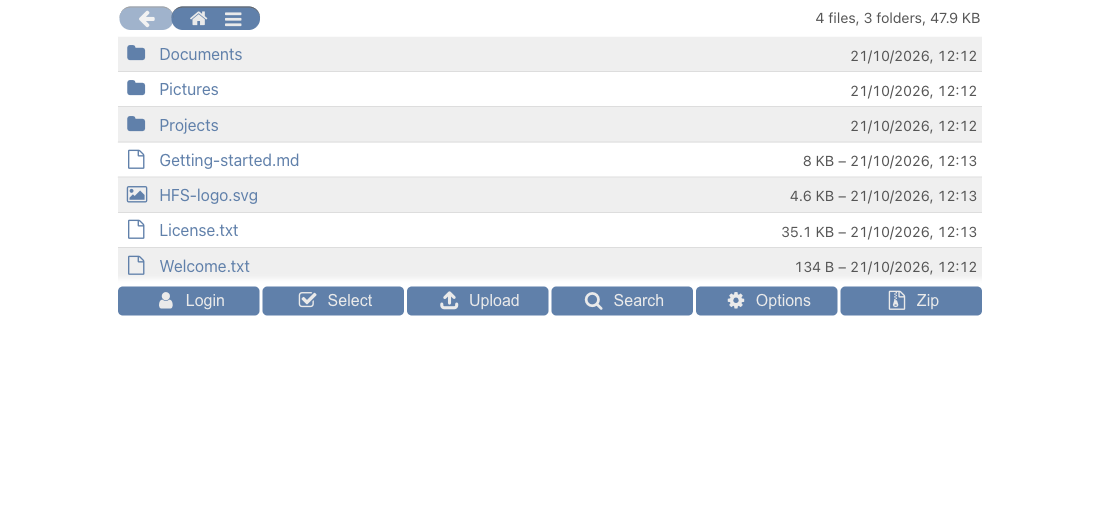
[Screenshots & video →](https://www.rejetto.com/hfs/#preview)
 ## Index
- [Introduction](#introduction)
- [How does it work](#how-does-it-work)
- [Features](#features)
- [Installation](#installation)
- [Configuration](#configuration)
- [Internationalization](#internationalization)
- [Hidden features](#hidden-features)
- [Contribute](#contribute)
- [More](#more)
## Introduction
Turn your computer into a file-sharing server in seconds.
* **Unlimited space and bandwidth** — no cloud upload, files come directly from your disk
* **Instant ZIP downloads**, even for huge folders
* **Virtual file system** to organize what you share
* **Real-time activity monitoring**
* **Bandwidth throttling** to control transfer speed
* **Plugin system** to extend functionality
Runs on: Windows, Linux, macOS, FreeBSD, Android
## How does it work
- run HFS on your computer; an administration webpage automatically shows up
- select which files and folders you want to be accessible
- access those files from a phone or another computer just using a browser
- possibly create accounts and limit access to files
## Features
- https
- easy certificate generation
- virtual file system
- mobile friendly
- search
- accounts
- resumable downloads & uploads
- download folders as zip archive
- delete, move and rename files
- plug-ins (anti-brute-force, thumbnails, ldap, themes, and more)
- simple website serving
- real-time monitoring of connections
- [show some files](https://github.com/rejetto/hfs/discussions/270)
- speed throttler
- geographic firewall
- admin web interface
- multi-language front-end
- virtual hosting
- [reverse-proxy support](https://github.com/rejetto/hfs/wiki/Reverse-proxy)
- comments in file descript.ion
- integrated media player
- [customizable with html, css, and javascript](https://github.com/rejetto/hfs/wiki/Customization)
- dynamic-dns updater
## Installation
The minimum Windows version required is 10 or Server 2019.
1. Download the zip file for your operating system from https://github.com/rejetto/hfs/releases
2. Unzip and launch the `hfs` file.
3. The browser should automatically open at `localhost`, so you can configure the rest in the Admin-panel.
For Docker, see https://github.com/rejetto/hfs/wiki/Docker.
For service installation, see https://github.com/rejetto/hfs/wiki/Service-installation.
For Homebrew, just `brew install rejetto/hfs/hfs`.
If you your platform is not directly supported, please see the [Other systems](#other-systems) section.
Troubleshooting
- If on your Mac you get *"cannot be opened because it is from an unidentified developer"*,
you can hold `control` key while clicking, then click `open`.
- If a browser cannot be opened on the computer where HFS runs, enter `create-admin `
in the **running HFS console** (this is not an OS shell command), then log in as `admin` with that password.
- If you cannot access the HFS console (for example, when running as a service),
you can [edit the config file to add your admin account](config.md#accounts)
- If you don't want to use an editor, you can create the file with this command:
`echo "create-admin: PASSWORD" > config.yaml`
- For a new Docker installation, set `HFS_INITIAL_ADMIN_PASSWORD` to **only the password**, and log in as `admin`.
It is used only when creating `config.yaml`; afterwards, manage the password in HFS and keep the config volume persistent.
The older `HFS_CREATE_ADMIN` takes precedence when non-empty and, by default, reapplies its password at every container start.
See [Docker setup](https://github.com/rejetto/hfs/wiki/Docker).
By default, HFS does not require a login when you access the *Admin-panel* from localhost.
If you don't like this behavior, disable it in the Admin-panel or enter this console command `config localhost_admin false`.
To uninstall, remove the files you unzipped and the configuration/data directory (see `config.md` for the location).
### Other systems
If you can't or don't want to run our binary versions, you can try this:
1. [Install Node.js](https://nodejs.org) version 18 to 24
2. Run at the command line `npx hfs@latest`
The `@latest` part is optional, and ensures that you are always up to date.
If this procedure fails, it may be that you are missing one of [these requirements](https://github.com/nodejs/node-gyp#installation).
Configuration and other files will be stored in `%HOME%/.vfs`
## Configuration
For configuration please see [config.md](config.md); it explains also where all configurations are stored.
## Internationalization
It is possible to show the Front-end in other languages.
Translation for some languages is already provided. If you find an error, consider reporting it
or [editing the source file](https://github.com/rejetto/hfs/tree/main/src/langs).
In the Languages section of the Admin-panel you can install additional language files.
If your language is missing, please consider [translating yourself](https://github.com/rejetto/hfs/wiki/Translation).
## Hidden features
- Append `#LOGIN` to the URL to open the login dialog
- Append `?lang=CODE` to the URL to force a specific language
- `Right-click` on toggle-all checkbox to *invert* the state of all checkboxes
- Append `?login=USER:PASSWORD` to automatically log in to the browser
- Append `?search=PATTERN` to trigger a search on startup
- Append `?onlyFiles` or `?onlyFolders` to limit the type of results
- Append `?get=basic` to display a basic web interface, intended for older/simpler browsers
- This is automatic if a basic browser is detected.
- Append `?autoplay=shuffle` to trigger show & play; `?autoplay` will not shuffle, but also will not start until the list is complete
- `Right-click` on "check for updates" to enter a URL of a version to install
- `Shift+click` on a file to *show* and play
- `Ctrl+backspace` to navigate to the parent folder
- Start typing a filename to focus it in the list
- `--consoleFile PATH` to also output all stdout/stderr to a file
- Set env.var. `DISABLE_UPDATE=1` (for containers)
- Launch with `--debug` or env.var. `HFS_DEBUG=1` to generate additional console logs
- Launch with `--no-central` to skip fetching updated info from GitHub (uses built-in data only)
## Contribute
There are several ways to contribute
- [Report bugs](https://github.com/rejetto/hfs/issues/new?labels=bug&template=bug_report.md)
It's very important to report bugs, and if you are not so sure about it, don't worry, we'll discuss it.
If you find important security problems, please [contact us privately](mailto:a@rejetto.com) so that we can publish a fix before
the problem is disclosed, for the safety of other users.
- Use beta versions, and give feedback.
While betas have more problems, you'll get more features and give a huge help to the project.
- [Translate to your language](https://github.com/rejetto/hfs/wiki/Translation).
- [Suggest ideas](https://github.com/rejetto/hfs/discussions)
While the project should not become too complex, yours may be an idea for a plugin.
- Write guides or make videos for other users. [We got a wiki](https://github.com/rejetto/hfs/wiki)!
- Submit your code
If you'd like to make a change yourself in the code, please first open an "issue" or "discussion" about it,
so we'll try to cooperate and understand what's the best path for it.
- [Make a plugin](dev-plugins.md)
A plugin can change the look (a theme), and/or introduce a new functionality.
## Code Signing Policy
Free code signing 🙏 provided by SignPath.io, certificate by [SignPath Foundation](https://signpath.org).
Author/Reviewer/Approver: Massimo Melina.
Privacy: Update checks are opt-out; other outbound connections are user-triggered.
## More
- [Additional information (Wiki)](https://github.com/rejetto/hfs/wiki)
- [APIs](https://github.com/rejetto/hfs/wiki/APIs)
- [Build yourself](dev.md)
- [License](LICENSE.txt)
- Flag images under MIT license from https://www.freakflagsprite.com