# auth_plug
**Repository Path**: mirrors_dwyl/auth_plug
## Basic Information
- **Project Name**: auth_plug
- **Description**: 🟢 auth_plug lets you seamlessly add authentication to your Phoenix App with ONE Environment Variable™ in less than 2 minutes! 🚀
- **Primary Language**: Unknown
- **License**: GPL-2.0
- **Default Branch**: main
- **Homepage**: None
- **GVP Project**: No
## Statistics
- **Stars**: 0
- **Forks**: 0
- **Created**: 2020-08-08
- **Last Updated**: 2026-10-10
## Categories & Tags
**Categories**: Uncategorized
**Tags**: None
## README
# `auth_plug`
The Elixir Plug that _seamlessly_ handles
all your authentication/authorization needs.

[](http://codecov.io/github/dwyl/auth_plug?branch=main)
[](https://hex.pm/packages/auth_plug)
[](http://hits.dwyl.com/dwyl/auth_plug)
[](https://github.com/dwyl/auth_plug/issues)
- [`auth_plug`](#auth_plug)
- [Why? 🤷](#why-)
- [What? 🔐](#what-)
- [Who? 👥](#who-)
- [How? 💡](#how-)
- [1. Installation 📝](#1-installation-)
- [2. Get Your `AUTH_API_KEY` 🔑](#2-get-your-auth_api_key-)
- [2.1 Save it as an Environment Variable](#21-save-it-as-an-environment-variable)
- [3. Add `AuthPlug` to Your `router.ex` file to Protect a Route 🔒](#3-add-authplug-to-your-routerex-file-to-protect-a-route-)
- [_Explanation_](#explanation)
- [4. Attempt to view the protected route to test the authentication! 👩💻](#4-attempt-to-view-the-protected-route-to-test-the-authentication-)
- [That's it!! 🎉](#thats-it-)
- [_Optional_ Auth](#optional-auth)
- [Using with `LiveView`](#using-with-liveview)
- [Using with an `API`](#using-with-an-api)
- [Documentation](#documentation)
- [Development](#development)
- [Clone](#clone)
- [Available information](#available-information)
- [Testing / CI](#testing--ci)
- [Recommended / Relevant Reading](#recommended--relevant-reading)
## Why? 🤷
**_Frustrated_** by the **complexity**
and **incomplete docs/tests**
in **_existing_ auth solutions**,
we built **`auth_plug`** to **simplify** our lives.
We needed a way to **_minimise_**
the steps
and **code** required
to add auth to our app(s).
With **`auth_plug`** we can **setup**
auth in any Elixir/Phoenix
App in **_less_ than 2 minutes**
with only **5 lines** of config/code
and **_one_ environment variable**.

## What? 🔐
An Elixir Plug (_HTTP Middleware_)
that a _complete_ beginner can use to add auth to a
Phoenix App
and _understand_ how it works.
No macros/behaviours to `use` (_confuse_).
No complex configuration or "implementation".
Just a basic plug that uses Phoenix Sessions
and standards-based JSON Web Tokens (JWT).
Refreshingly simple. The way auth _should_ be done.
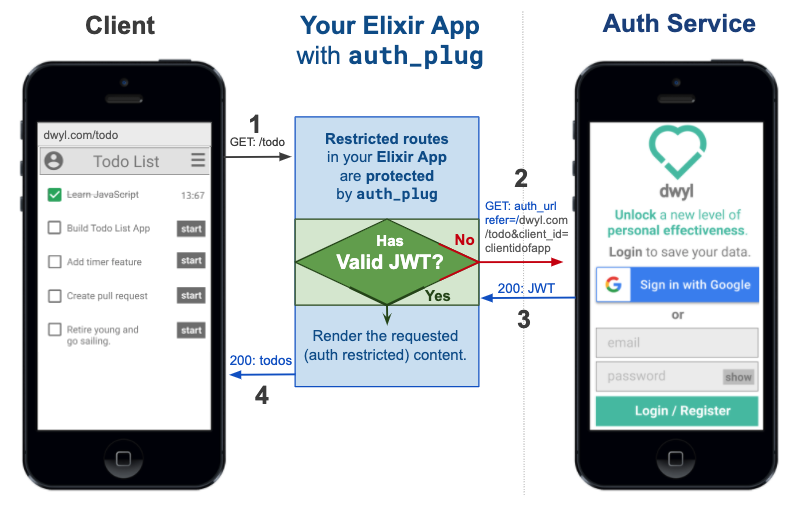
Edit this diagram:
[docs.google.com/presentation/d/1PUKzbRQOEgHaOmaEheU7T3AHQhRT8mhGuqVKotEJkM0](https://docs.google.com/presentation/d/1PUKzbRQOEgHaOmaEheU7T3AHQhRT8mhGuqVKotEJkM0/edit#slide=id.g841dc8bc44_0_5)
**`auth_plug`** protects any routes in your app
that require authentication.
**`auth_plug`** is just
[57 lines](https://codecov.io/gh/dwyl/auth_plug/tree/master/lib)
of (_significant_)
[code](https://github.com/dwyl/auth_plug/tree/master/lib);
the rest is comprehensive comments
to help _everyone understand_ how it works.
As with _all_ our code,
it's meant to be as beginner-friendly as possible.
If you get stuck or have any questions,
please [**_ask_**!](https://github.com/dwyl/auth_plug/issues)
## Who? 👥
We built this plug for use in _our_ products/services.
It does _exactly_ what we want it to and nothing more.
It's tested, documented and open source the way _all_ our code is.
It's **not _yet_** a **general purpose** auth solution
that _anyone_ can use.
If after reading through this you feel that
this is something you would like to have
in your own Elixir/Phoenix project,
[**_tell us_**!](https://github.com/dwyl/auth_plug/issues)
# How? 💡
_Before_ you attempt to use the **`auth_plug`**,
try the Heroku example version so you know what to expect:
https://auth-plug-example.herokuapp.com/admin

Notice how when you first visit the
[`auth-plug-example.herokuapp.com/admin`](https://auth-plug-example.herokuapp.com/admin)
page, your browser is _redirected_ to:
https://dwylauth.herokuapp.com/?referer=https://auth-plug-example.herokuapp.com/admin&auth_client_id=etc.
The auth service handles the actual authentication
and then transparently redirects back to
[`auth-plug-example.herokuapp.com/admin?jwt=etc.`](https://auth-plug-example.herokuapp.com/admin)
with a JWT session.
For more detail on how the `Auth` service works,
please see: https://github.com/dwyl/auth
If you get stuck during setup,
clone and run our fully working example:
https://github.com/dwyl/auth_plug_example#how
## 1. Installation 📝
Add **`auth_plug`**
to your list of dependencies in `mix.exs`:
```elixir
def deps do
[
{:auth_plug, "~> 1.6"}
]
end
```
Once you've saved the `mix.exs` file,
download the dependency with:
```sh
mix deps.get
```
## 2. Get Your `AUTH_API_KEY` 🔑
Visit:
[https://authdemo.fly.dev/](https://authdemo.fly.dev/apps/new)
and create a **New App**.
Once you have an App,
you can export an `AUTH_API_KEY` environment variable.
e.g:

### 2.1 Save it as an Environment Variable
Create a file called `.env` in the root directory of your app
and add the following line:
```txt
export AUTH_API_KEY=2cfxNaWUwJBq1F4nPndoEHZJ5Y/2cfxNadrhMZk3iaT1L5k6Wt67c9ScbGNP/dwylauth.herokuapp.com
```
The run the following command in your terminal:
```
source .env
```
That will export the environment variable AUTH_API_KEY.
Remember to add `.env` to your [`.gitignore`](https://github.com/dwyl/auth_plug/blob/1ebb60938487da7e740a79b2a4639b29f2ba44ac/.gitignore#L52) file.
e.g:
```
echo ".env" >> .gitignore
```
## 3. Add `AuthPlug` to Your `router.ex` file to Protect a Route 🔒
Open the `lib/app_web/router.ex` file and locate the section:
```elixir
scope "/", AppWeb do
pipe_through :browser
get "/", PageController, :index
end
```
Immediately below this add the following lines of code:
```elixir
pipeline :auth, do: plug(AuthPlug)
scope "/", AppWeb do
pipe_through :browser
pipe_through :auth
get "/admin", PageController, :admin
end
```
> E.g:
> [`/lib/app_web/router.ex#L23-L29`](https://github.com/dwyl/auth_plug_example/blob/8ce0f10e656b94a93b8f02af240b3897ce23c006/lib/app_web/router.ex#L23-L29)
#### _Explanation_
There are two parts to this code:
1. Create a new pipeline called `:auth` which will execute the `AuthPlug`.
2. Create a new scope where we `pipe_through`
both the `:browser` and `:auth` pipelines.
This means that the `"/admin"` route is protected by `AuthPlug`.
> **Note**: Ensure the route you are protecting works _without_ `AuthPlug`.
> If in doubt simply comment out the line `pipe_through :auth` to check.
## 4. Attempt to view the protected route to test the authentication! 👩💻
Now that the `/admin` route is protected by **`auth_plug`**,
attempt to view it in your browser e.g: http://localhost:4000/admin
If you are not already authenticated,
your browser will be redirected to:
https://dwylauth.herokuapp.com/?referer=http://localhost:4000/admin&auth_client_id=etc
Once you have successfully authenticated with your GitHub or Google account,
you will be redirected back to `localhost:4000/admin`
where the `/admin` route will be visible.

## That's it!! 🎉
You just setup auth in a Phoenix app using **`auth_plug`**!
If you got stuck or have any questions,
please
[open an issue](https://github.com/dwyl/auth_plug/issues),
we are here to help!
## _Optional_ Auth
The use case shown above is protecting an endpoint
that you don't want people to see if they haven't authenticated.
If you're building an app that has routes
where you want to show generic content to people who have _not_ authenticated,
but then show more detail/custom actions to people who _have_ authenticated,
that's where _Optional_ Auth comes in.
To use _optional_ auth it's even _easier_ than required auth.
Open your `lib/app_web/router.ex` file and add the following line
above the routes you want show optional data on:
```elixir
pipeline :authoptional, do: plug(AuthPlugOptional, %{})
```
e.g:
[`/lib/app_web/router.ex#L13`](https://github.com/dwyl/auth_plug_example/blob/f4c79e540ed8ef2d4c587647b31e93fec9855f59/lib/app_web/router.ex#L13)
Then add the following line to your main router scope:
```elixir
pipe_through :authoptional
```
e.g:
[`/lib/app_web/router.ex#L17`](https://github.com/dwyl/auth_plug_example/blob/f4c79e540ed8ef2d4c587647b31e93fec9855f59/lib/app_web/router.ex#L17)
That's it now you can check for `conn.assigns.person` in your templates
and display relevant info/actions to the person if they are logged in.
```html
<%= if Map.has_key?(@conn.assigns, :person) do %> Hello <%=
@conn.assigns.person.givenName %>! <% end %>
```
e.g:
[`/lib/app_web/templates/page/optional.html.eex#L2-L3`](https://github.com/dwyl/auth_plug_example/blob/f4c79e540ed8ef2d4c587647b31e93fec9855f59/lib/app_web/templates/page/optional.html.eex#L2-L3)
Try it: http://auth-plug-example.herokuapp.com/optional
## Using with `LiveView`
If you are using **`LiveView`**,
having socket assigns with this info
is useful for conditional rendering.
For this, you can use the
`assign_jwt_to_socket/3` function
to add the `jwt` information to the socket,
e.g:
```elixir
socket = socket
|> AuthPlug.assign_jwt_to_socket(&Phoenix.Component.assign_new/3, jwt)
```
This will add a `person` object with information
about the authenticated person.
Here is the assigns should look like
after calling this function.
```elixir
socket #=> #Phoenix.LiveView.Socket<
id: 123,
...
assigns: %{
__changed__: %{loggedin: true, person: true},
loggedin: true,
person: %{
aud: "Joken",
email: "person@dwyl.com",
exp: 1701020233,
iat: 1669483233,
iss: "Joken",
jti: "2slj49u49a3f3896l8000083",
nbf: 1669483233,
session: 1,
username: "username",
givenName: "Test Smith",
username: "dwyl_username"
}
},
transport_pid: nil,
...
>
```
## Using with an `API`
Although you'll probably use this package
in scopes that are piped through
`:browser` pipelines,
it can still be used in APIs -
using a pipeline that only accepts `json` requests.
Like so:
```elixir
pipeline :api do
plug :accepts, ["json"]
end
scope "/api", AppWeb do
pipe_through [:api]
resources "/items", ItemController, only: [:create, :update]
end
```
You may create a pipeline using `auth_plug`,
either be it for normal or optional authentication.
However, this pipeline
**has to to use the [`fetch_session`](https://hexdocs.pm/plug/Plug.Conn.html#fetch_session/2) plug**
for `auth_plug` to work.
For example,
if you wanted to pipe your API scope
inside your `router.ex` file
with `:authOptional`...
```elixir
scope "/api", AppWeb do
pipe_through [:api, :authOptional]
resources "/items", ItemController, only: [:create, :update]
end
```
it should be defined as such:
```elixir
pipeline :authOptional do
plug :fetch_session
plug(AuthPlugOptional)
end
```
# Documentation
Function docs are available at:
https://hexdocs.pm/auth_plug.
As always, we attempt to comment our code as much as possible,
but if _anything_ is unclear,
please open an issue:
[github.com/dwyl/**auth_plug/issues**](https://github.com/dwyl/auth_plug/issues)
# Development
If you want to _contribute_ to this project,
that's _great_!
Please ensure you create an issue
to discuss your idea/plan
_before_ working on a feature/update
to avoid any wasted effort.
## Clone
```sh
git clone git@github.com:dwyl/auth_plug.git
```
Create a `.env` file:
```sh
cp .env_sample .env
source .env
```
Run the test with coverage:
```sh
mix c
```
## Available information
By default using the
[`auth`](https://github.com/dwyl/auth)
authentication service,
`auth_plug` makes the following information available in `conn.assigns`:
```
jwt :: string()
person :: %{
id :: integer() # This stays unique across providers
auth_provider :: string()
email :: string()
givenName :: string()
picture :: string()
# Also includes standard jwt metadata you may find useful:
aud, exp, iat, iss
}
```
# Testing / CI
If you are using `GitHub CI`
to _test_ your Auth Controller code
that invokes any of the `AuthPlug.Token` functions -
and you should be ... -
then you will need to make the
`AUTH_API_KEY` accessible to `@dependabot`.
Visit: `https://github.com/{org}/{project}/settings/secrets/dependabot`
e.g: https://github.com/dwyl/mvp/settings/secrets/dependabot
And add the `AUTH_API_KEY` environment variable,
e.g:

Thanks to: [@danielabar](https://github.com/danielabar)
for her excellent/succinct post on this topic:
[danielabaron.me/blog/dependabot-secrets](https://danielabaron.me/blog/dependabot-secrets/)
# Recommended / Relevant Reading
If you are new to Elixir Plug,
we recommend following:
[github.com/dwyl/elixir-plug-tutorial](https://github.com/dwyl/elixir-plug-tutorial).
To understand JSON Web Tokens,
read:
[https://github.com/dwyl/learn-json-web-tokens](https://github.com/dwyl/learn-json-web-tokens).